
Welcome to the wonderful World of Skynamo Analytics!
The following information will be required:
- Credentials to access your Skynamo data through the reporting API (Client ID, Client Secret).
Getting your access token via POSTMAN
From POSTMAN, create a new collection and then click on Create new Collection and then on Add a request.
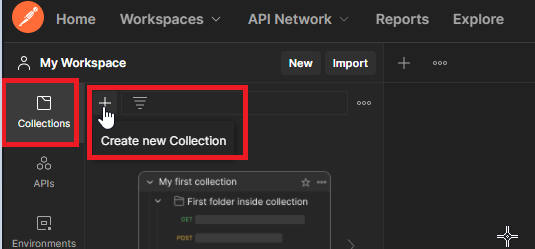
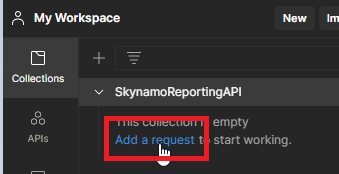
- Get an access_token using the credentials (Client ID, Client Secret) provided to access the Skynamo Reporting API.
curl --request POST \
--url https://login.skynamo.me/oauth/token \
--header ‘content-type: application/json’ \
--data {“client_id”:“XXXX”,“client_secret”:“XXX”,“audience”:“https://integration.skynamo.me/”,
“grant_type”:“client_credentials”}
Select POST and enter the request URL:
 Select Headers and add the relevant KEY:Content-Type and VALUE: application/json
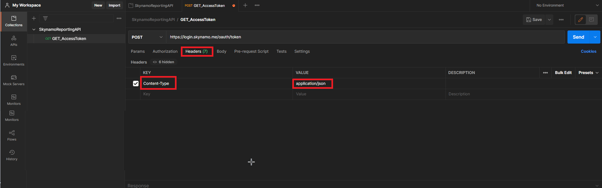 Select Body and raw and paste the below with your relevant Client ID and client secret:
- {"client_id":"XXXX","client_secret":"XXX","audience":"https://integration.skynamo.me/",
"grant_type":"client_credentials"}

Then click on Send.
Your access token should then generate below between the double quotations (" ").