
We have now made it easy to manage your Skynamo Subscription. Each of the sections below include links for the "How to" guide.
You can now:
Manage your subscription details:
- Update your account information: How to view or change your account information
- Update your Authorized Signatory: How to update your Authorized Signatory
- Update your billing contact: How to update your billing contact
- Change your billing address: How to change your billing address
- Add payment methods: How to add payment methods
- See your billing history: How to see your billing history
- View and download your billing documents: How to access invoices, credit notes, and statements
- Add a PO number: How to add a PO number
- Add your VAT number: How to update your VAT number
Extend and manage your subscription licenses:
- Add or reduce licenses: How to add or reduce licenses
- Add a license for an additional instance: How to add additional instances
- Add extra features (such as RADAR, Reporting API or additional instances): How to add additional features to your billing (RADAR or reporting API)
- How to remove extra features from your billing ((such as RADAR, Reporting API or additional instances): How to remove add-ons from your billing
- Cancel your Subscription: How to cancel your Skynamo Subscription
Manage your users:
- Add a new user: How to add new users
- Deactivate or delete users: How to deactivate or delete users
- Change user details: How to change a user's details
- Give user Subscription administrator access: How to give a user Subscription administrator access
- Create a Subscription Admin user: How to create a Subscription Admin user
Manage your instance:
- Update users' roles: How to update the role a user is assigned to
- Assigning users to different instances: How to assign a user to another instance
- How to add an additional instance: How to add an additional instance
- Multi-Factor Authentication (MFA) on Skynamo: Multi-Factor Authentication (MFA) on Skynamo
The subscription page can be accessed by going to app.skynamo.me and entering your email address and password. If you do not remember your password, you can reset it by clicking on "Get a new password" on the password page.
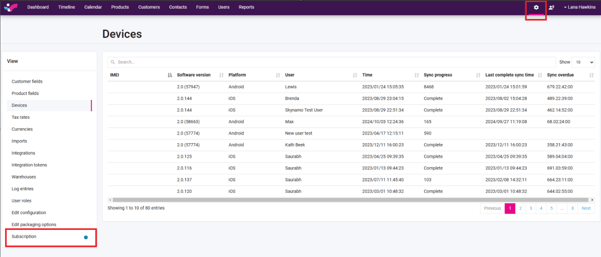
Alternatively, if you are a user on Skynamo (not just a Subscription Administrator), you can access it on Settings under the Subscription tab:
Please note, if you deactivate/delete a user without reducing your user license count, you will still be billed for that license.